Downloads
H-eatqore Addons Checker
A helper tool for finding mismatched versions of custom campaigns
- Download the two files and place it to your L4D addons directory
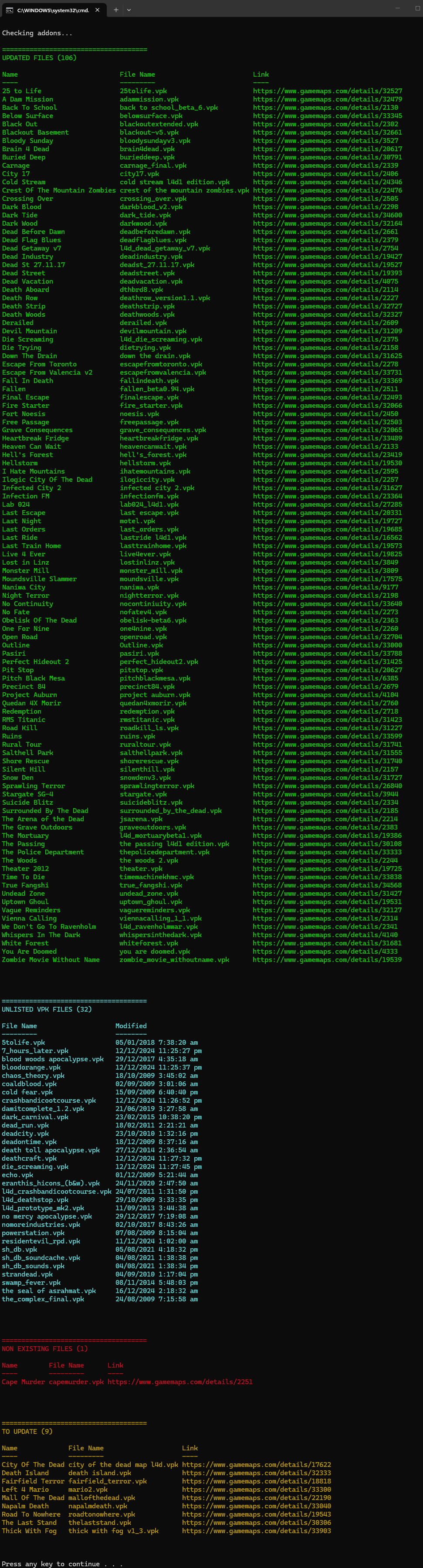
(ex. C:\Program Files (x86)\Steam\steamapps\common\left 4 dead\left4dead\addons) - Run _addons-checker.bat and you should see the result something like the image below
NOTE: This tool is reading filenames and filedates from your folder and comparing them with the server files. To avoid confusion, Do not rename the extracted VPK files downloaded from gamemaps.com
- Updated Files - These files match the server's files
- Unlisted VPK Files - The server does not have these files but you have. (This is fine)
- Non Existing Files - The server have these files but you don't have. (You can still connect to the server but can not play these campaigns)
- To Update - Both the server and you have the files but yours is not updated. You should download the latest file from gamemaps.com, the link is provided in the result. (You can still connect to the server but can not play these campaigns)